

Endpoint version
A Dynamic Snapshot serves all your content from server memory and hot-refreshes it when you publish.
No rebuild. No API call per read.
The pattern has two pieces:
- Where the snapshot is read from → the
snapshotLoader. - Who triggers the refresh →
refreshSnapshot().
This is the simplest version of all.
The snapshotLoader pulls directly from the Content Island API with exportSnapshot(). No bucket. No broker. Zero infrastructure.
The refresh is triggered by a GitHub Action that calls a protected endpoint in your app.
How does it work?
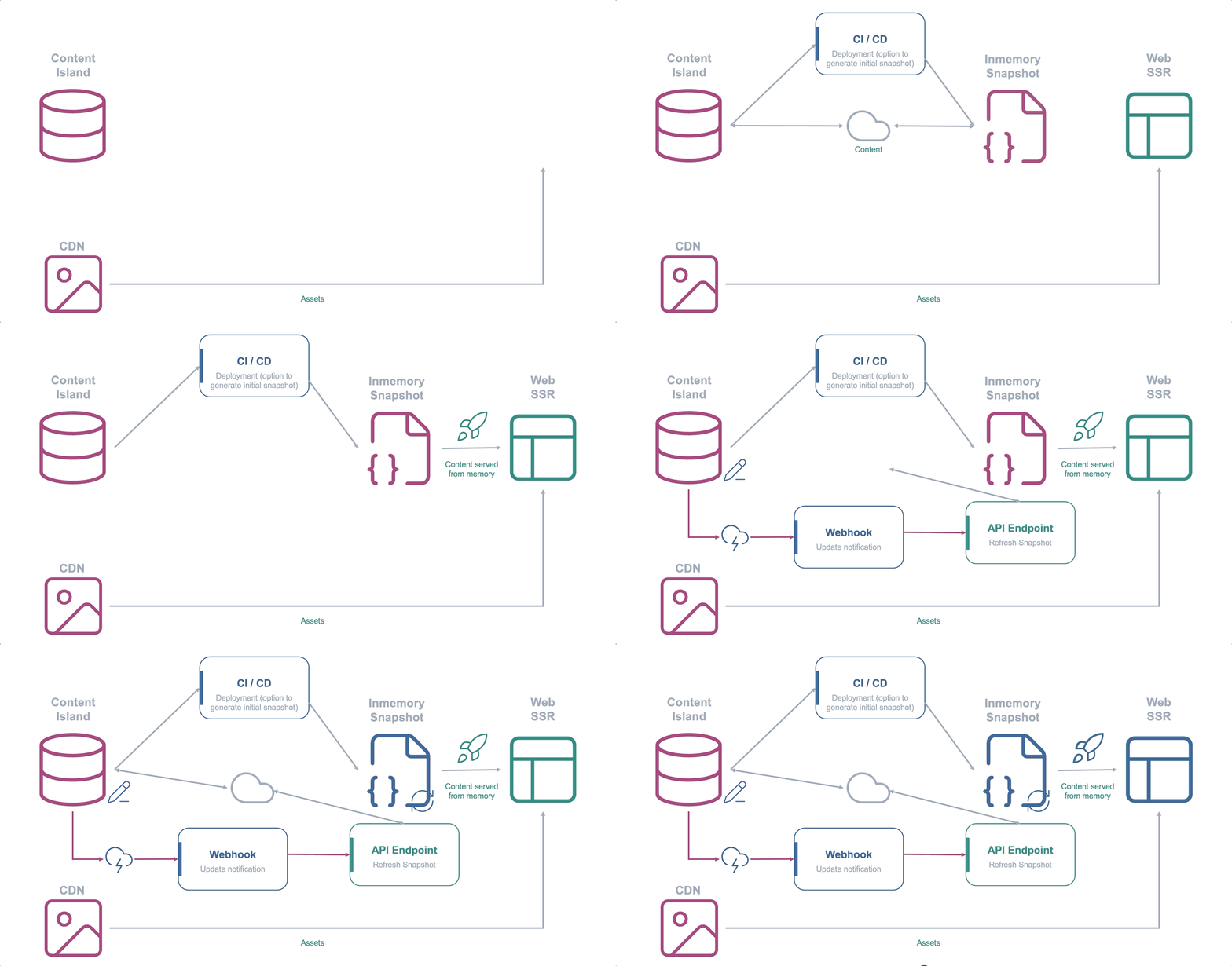
- Source: the API itself. The
snapshotLoaderisasync () => exportSnapshot({ accessToken }). - Trigger: a
POSTto the refresh endpoint.
That POST is issued by a GitHub Action that Content Island launches via repository_dispatch when you publish content.
Locally, you simulate it with a curl.
When to choose it?
The most direct option to get started:
- No additional services.
- No infrastructure to maintain.
But keep in mind that every refresh:
- Performs a full
exportagainst the API. - Only updates the instance that receives the
POST.
Step by step
This version is the base TanStack Start project, with no extra infrastructure.
The other two start from here. Only the snapshotLoader and the trigger change.
-
Create the project and install the client:
Terminal window npx @tanstack/cli create content-island-dynamiccd content-island-dynamicnpm i @content-island/api-client dotenv -
Create the
.envwith your read token and a secret for the refresh endpoint:.env CONTENT_ISLAND_TOKEN=your-read-tokenREFRESH_SECRET=put-a-unique-and-secure-secret-here -
Create the client in snapshot mode. This is the only file that changes between versions. The
snapshotLoaderpulls from the API withexportSnapshot():src/server/content-island.ts import 'dotenv/config';import { createClient, exportSnapshot } from '@content-island/api-client';const accessToken = process.env.CONTENT_ISLAND_TOKEN!;export const contentIslandClient = createClient({accessToken,mode: 'snapshot',snapshotLoader: async () => exportSnapshot({ accessToken }),});// Loads the snapshot the first time the client is used on the server.let primed: Promise<unknown> | null = null;export function ensureSnapshot() {if (!primed) primed = contentIslandClient.refreshSnapshot();return primed;} -
Read from the snapshot with a server function and show it on a page. The
exportedAtlets you see at a glance when it was refreshed:src/server/content.ts import { createServerFn } from '@tanstack/react-start';import { contentIslandClient, ensureSnapshot } from './content-island';export const getHomeData = createServerFn({ method: 'GET' }).handler(async () => {await ensureSnapshot();const info = await contentIslandClient.getSnapshotInfo();const posts = await contentIslandClient.getContentList({ contentType: 'post' });return { exportedAt: info.exportedAt, count: posts.length };});src/routes/index.tsx import { createFileRoute } from '@tanstack/react-router';import { getHomeData } from '../server/content';export const Route = createFileRoute('/')({loader: () => getHomeData(),component: Home,});function Home() {const { exportedAt, count } = Route.useLoaderData();return (<main><p>Snapshot exported: {exportedAt}</p><p>Entries in memory: {count}</p></main>);} -
Create the refresh endpoint, protected with the secret. This is what the GitHub Action or the webhook will call:
// src/routes/api.content-island.refresh.ts -> POST /api/content-island/refreshimport { createFileRoute } from '@tanstack/react-router';import { contentIslandClient } from '../server/content-island';export const Route = createFileRoute('/api/content-island/refresh')({server: {handlers: {POST: async ({ request }) => {if (request.headers.get('x-refresh-secret') !== process.env.REFRESH_SECRET) {return new Response('Unauthorized', { status: 401 });}const result = await contentIslandClient.refreshSnapshot();return Response.json(result); // { status: 'updated' | 'unchanged', meta }},},},}); -
Try it. Start the app and simulate the trigger with a
curl:Terminal window npm run dev # http://localhost:3000curl -fsS -X POST http://localhost:3000/api/content-island/refresh \-H "x-refresh-secret: put-a-unique-and-secure-secret-here"Publish something in Content Island, repeat the
curland reload the page:exportedAtwill have changed, with no restart and no rebuild. In production, that samePOSTis made by a GitHub Action launched by the Content Island webhook.
Automate it with a CD workflow
In the step by step you triggered the refresh by hand with curl.
In production that same POST is made by a GitHub Action, which Content Island launches via repository_dispatch every time you publish.
No rebuild, no redeploy. Just a POST to the endpoint you already have.
-
Create the workflow that calls your refresh endpoint. It listens for the
content-refreshevent (andworkflow_dispatchso you can test it by hand):.github/workflows/refresh.yml name: Refresh snapshoton:workflow_dispatch:repository_dispatch:types: [content-refresh]jobs:refresh:runs-on: ubuntu-lateststeps:- name: POST to the refresh endpointenv:REFRESH_URL: ${{ secrets.REFRESH_URL }}REFRESH_SECRET: ${{ secrets.REFRESH_SECRET }}run: |response=$(curl -sS -o /tmp/body -w "%{http_code}" -X POST "$REFRESH_URL" \-H "x-refresh-secret: $REFRESH_SECRET")echo "HTTP $response"cat /tmp/body; echo[ "$response" = "200" ] || exit 1 -
Add the repository secrets under Settings → Secrets and variables → Actions:
Secret Value REFRESH_URLthe public URL of your endpoint, e.g. https://your-app.com/api/content-island/refreshREFRESH_SECRETthe same value REFRESH_SECREThas in your deployed app -
Connect the Content Island webhook. In your project → Webhooks section → new GitHub webhook. The Event name must match the workflow’s
types:(content-refresh). Content Island also needs a fine-grained GitHub token with Contents: Read and write permission on the repository to call the repository dispatch API.Raw equivalent (useful for testing): Content Island makes this authenticated
POSTto the GitHub API.Terminal window curl -X POST https://api.github.com/repos/<owner>/<repo>/dispatches \-H "Authorization: Bearer <YOUR_GITHUB_PAT>" \-H "Accept: application/vnd.github+json" \-d '{"event_type":"content-refresh"}' -
Try it. In the Actions tab →
refresh.yml→ Run workflow (workflow_dispatch): it should finish green withHTTP 200. Then publish something in Content Island and you’ll see a new run launched byrepository_dispatch.
Add a static snapshot as a seed
In this version the snapshotLoader pulls from the API on every refresh.
The problem? On a cold start, or in a deployment without a read token, the app has no content until the first export.
The solution: download the snapshot statically at build time and use it as a seed.
- With a token → the loader fetches live content.
- Without a token → it serves the JSON embedded in the bundle.
-
Download the snapshot with the CLI and store it as a versioned file. Add a script to your
package.json:package.json {"scripts": {"snapshot:export": "content-island export --access-token \"$CONTENT_ISLAND_TOKEN\" --snapshot-path content-island-snapshot.json"}}Terminal window npm run snapshot:export # generates content-island-snapshot.json -
Make the
snapshotLoaderhybrid: with a token it fetches live content, and without one it serves the snapshot from the bundle:src/server/content-island.ts import 'dotenv/config';import { type ContentSnapshot, createClient, exportSnapshot } from '@content-island/api-client';import snapshot from '../../content-island-snapshot.json' with { type: 'json' };const accessToken = process.env.CONTENT_ISLAND_TOKEN;export const contentIslandClient = createClient({accessToken: accessToken ?? 'snapshot-mode',mode: 'snapshot',snapshotLoader: accessToken? async () => exportSnapshot({ accessToken }): async () => snapshot as ContentSnapshot,}); -
Refresh the seed in your CD. Add a step that regenerates the snapshot before building, so the versioned JSON doesn’t go stale:
.github/workflows/deploy.yml steps:- uses: actions/checkout@v4- uses: actions/setup-node@v4with:node-version: 20- run: npm ci- name: Export static snapshotenv:CONTENT_ISLAND_TOKEN: ${{ secrets.CONTENT_ISLAND_TOKEN }}run: npm run snapshot:export- run: npm run build# ...deploy
Example
Full code: content-island/examples-dynamic-snapshot → 01-api-load.