

Bucket storage (S3)
A Dynamic Snapshot serves all your content from server memory and hot-refreshes it when you publish.
No rebuild. No API call per read.
The pattern has two pieces:
- Where the snapshot is read from → the
snapshotLoader. - Who triggers the refresh →
refreshSnapshot().
In this version the JSON lives in an S3 bucket (MinIO locally).
An example script plays the role of a “GitHub Action”: it exports the snapshot with exportSnapshot(), uploads it to the bucket and notifies the app.
The snapshotLoader reads the JSON directly from the bucket.
How does it work?
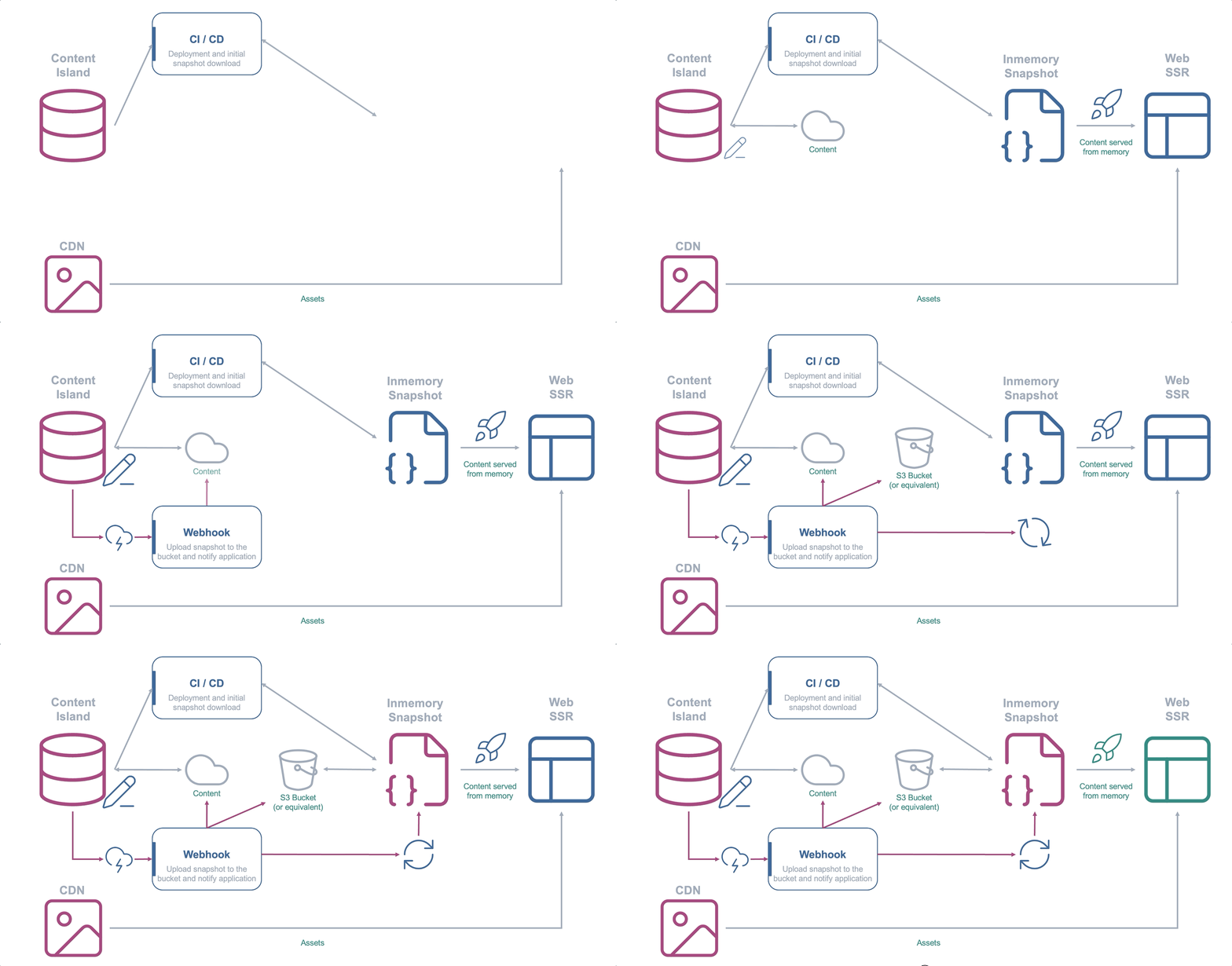
- Source: the bucket. The
snapshotLoaderfetches the JSON withcache: 'no-store'. - Trigger: a
POSTto the refresh endpoint.
That POST is issued right after uploading the snapshot to the bucket.
When to choose it?
Choose it when you want snapshot generation to not depend on your app.
The JSON is produced and uploaded to the bucket by any external process — your CI, a cron, a worker. The instances only read it.
It’s an especially good fit if you already have object storage (S3, R2, Blob Storage) in your infrastructure.
Step by step
Start from the endpoint version project.
Only the snapshotLoader and the bucket upload step change.
-
Start MinIO (S3 locally):
Terminal window docker run -d --name minio -p 9000:9000 -p 9001:9001 \-e MINIO_ROOT_USER=minioadmin -e MINIO_ROOT_PASSWORD=minioadmin \quay.io/minio/minio server /data --console-address ":9001" -
Create the bucket and make it publicly readable with the
mcclient (via Docker, no install needed):Terminal window alias mc='docker run --rm -i --network=host \-e MC_HOST_local=http://minioadmin:minioadmin@localhost:9000 quay.io/minio/mc'mc mb local/content-island # creates the bucketmc anonymous set download local/content-island # public GET -
Change the
snapshotLoaderto read from the bucket and add the URL to your.env. The rest oflib/content-island.ts(theglobalThissingleton andensureSnapshot()) is unchanged from the endpoint version:lib/content-island.ts snapshotLoader: async () => {const res = await fetch(process.env.SNAPSHOT_URL!, { cache: 'no-store' });return res.text();},.env SNAPSHOT_URL=http://localhost:9000/content-island/content-island-snapshot.json -
Create the example script. Locally it plays the role of the GitHub Action: it exports, uploads to the bucket and notifies the app (in production, your CI does that job). It sources the
.envitself to haveCONTENT_ISLAND_TOKENandREFRESH_SECRETat hand:scripts/publish-bucket.sh #!/usr/bin/env bashset -euo pipefailexport AWS_ACCESS_KEY_ID=minioadminexport AWS_SECRET_ACCESS_KEY=minioadminexport AWS_DEFAULT_REGION=us-east-1# Take CONTENT_ISLAND_TOKEN and REFRESH_SECRET from the .envset -a; source "$(dirname "$0")/../.env"; set +a# 1) Export the snapshot from Content Islandnpx content-island export \--access-token "$CONTENT_ISLAND_TOKEN" \--snapshot-path ./content-island-snapshot.json# 2) Upload it to the bucket (MinIO speaks S3; only the --endpoint-url changes)aws --endpoint-url http://localhost:9000 s3 cp \./content-island-snapshot.json \s3://content-island/content-island-snapshot.json# 3) Notify the app so it reloads in memorycurl -fsS -X POST http://localhost:3000/api/content-island/refresh \-H "x-refresh-secret: $REFRESH_SECRET"echo "✅ snapshot published and app notified"Add a script to your
package.jsonto launch it comfortably:package.json "scripts": {"publish:bucket": "bash scripts/publish-bucket.sh"} -
Try it. Do a first upload to the bucket before starting (otherwise the first refresh finds no JSON):
Terminal window npm run publish:bucket # exports, uploads to the bucket and notifies the appnpm run dev # http://localhost:3000Every time you publish content, run
npm run publish:bucketagain and reload the page.
The same flow in GitHub Actions
This is how the local script would translate to a CD workflow. It’s illustrative: adapt it to your bucket provider and your deployment.
It keeps the same order as locally (upload first, then notify) and is launched with repository_dispatch from the Content Island webhook (or by hand with workflow_dispatch):
name: Publish snapshot to the bucket
on:  workflow_dispatch:  repository_dispatch:    types: [content-refresh]
jobs:  publish:    runs-on: ubuntu-latest    steps:      - uses: actions/setup-node@v4        with:          node-version: 20
      # 1) Export the snapshot from Content Island      - name: Export snapshot        env:          CONTENT_ISLAND_TOKEN: ${{ secrets.CONTENT_ISLAND_TOKEN }}        run: npx content-island export --access-token "$CONTENT_ISLAND_TOKEN" --snapshot-path ./content-island-snapshot.json
      # 2) Upload it to the bucket (real S3 here; adapt it to your provider)      - name: Configure AWS credentials        uses: aws-actions/configure-aws-credentials@v4        with:          aws-access-key-id: ${{ secrets.AWS_ACCESS_KEY_ID }}          aws-secret-access-key: ${{ secrets.AWS_SECRET_ACCESS_KEY }}          aws-region: ${{ secrets.AWS_REGION }}      - name: Upload to the bucket        run: aws s3 cp ./content-island-snapshot.json "s3://${{ secrets.SNAPSHOT_BUCKET }}/content-island-snapshot.json"
      # 3) Notify the app so it reloads in memory      - name: Notify the app        env:          REFRESH_URL: ${{ secrets.REFRESH_URL }}          REFRESH_SECRET: ${{ secrets.REFRESH_SECRET }}        run: curl -fsS -X POST "$REFRESH_URL" -H "x-refresh-secret: $REFRESH_SECRET"
Example
The examples repository implements the pattern in TanStack Start; the steps above are the adaptation to Next.js (only the framework glue changes): content-island/examples-dynamic-snapshot → 02-bucket-s3.