

Redis pub/sub
A Dynamic Snapshot serves all your content from an in-memory snapshot on the server and hot-refreshes it when you publish, with no rebuild and no API call per read. The pattern has two pieces: where the snapshot is read from (snapshotLoader) and who triggers the refresh (refreshSnapshot()).
In this version the JSON lives in Redis. A publisher exports the snapshot with exportSnapshot(), does SET + PUBLISH, and all subscribed instances refresh at once with a single message.
How does it work?
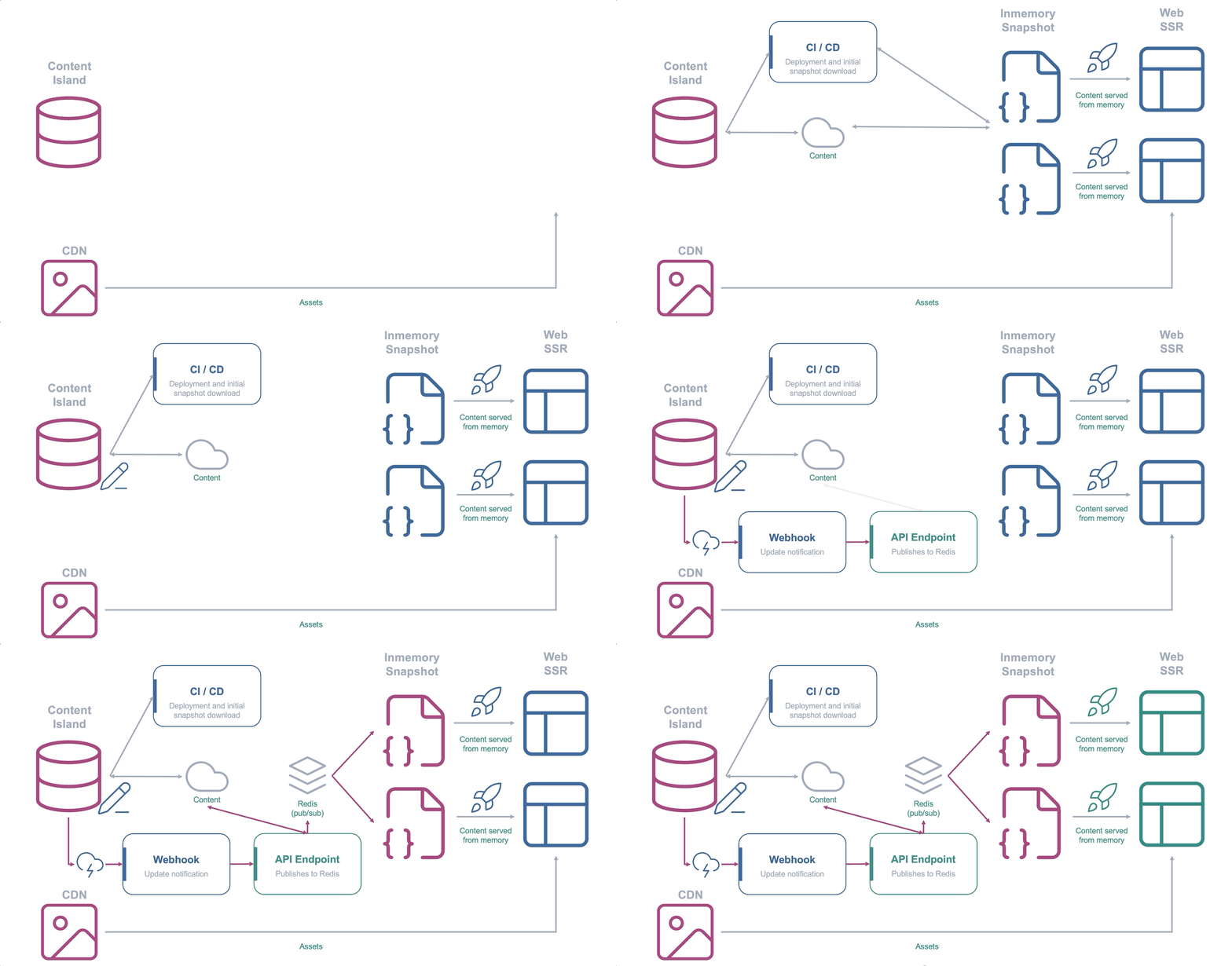
- Source: Redis. The
snapshotLoaderreads the snapshot key. - Trigger with pub/sub: instead of one
POSTper instance, a singlePUBLISHnotifies all subscribed replicas and each one callsrefreshSnapshot().
When to choose it?
- Designed for horizontal scaling: refresh N instances with a single message, without per-instance webhooks or N API calls.
- Requires a Redis reachable by all replicas.
Step by step
Start from the endpoint version project. We swap the snapshotLoader for Redis, add the subscription and a publisher.
-
Start Redis and install the dependencies:
Terminal window docker run -d --name redis -p 6379:6379 redis:7npm i redis.env REDIS_URL=redis://localhost:6379 -
Create the Redis connection. We register an
errorhandler so a dropped connection doesn’t take down the process:src/lib/redis.ts import { createClient as createRedis } from 'redis';export const redis = createRedis({ url: process.env.REDIS_URL });// node-redis throws on unhandled 'error' events; we log them so a dropped// connection doesn't take down the process.redis.on('error', err => console.error('Redis error', err));export const redisReady = redis.connect(); -
Change the
snapshotLoaderto read from Redis and subscribe to the channel. On first use, each instance listens and refreshes itself when the publisher notifies. If the snapshot doesn’t exist in Redis yet, we don’t cache the failure, so the next request retries:src/lib/content-island.ts import { createClient } from '@content-island/api-client';import { redis, redisReady } from './redis';const accessToken = process.env.CONTENT_ISLAND_TOKEN!;const SNAPSHOT_KEY = 'content-island:snapshot';const CHANNEL = 'content-island:updated';// Express runs as a single long-lived process: a module-level singleton is// enough to share a client (and a snapshot) across requests.export const contentIslandClient = createClient({accessToken,mode: 'snapshot',// The loader reads the snapshot from Redis.snapshotLoader: async () => {await redisReady;return (await redis.get(SNAPSHOT_KEY)) ?? '';},});// On first use, this instance subscribes to the channel and refreshes itself// every time the publisher notifies. It also does the initial snapshot load.let primed: Promise<unknown> | null = null;export function ensureSnapshot() {if (!primed) {primed = (async () => {await redisReady;// A Redis connection can't subscribe and run commands at the same// time, so the subscriber uses its own duplicated connection.const sub = redis.duplicate();sub.on('error', err => console.error('Redis subscriber error', err));await sub.connect();await sub.subscribe(CHANNEL, () => {contentIslandClient.refreshSnapshot().catch(console.error);});await contentIslandClient.refreshSnapshot(); // initial load})().catch(err => {// Don't cache the failure: if the snapshot doesn't exist in Redis yet,// the next request retries instead of reusing a rejected promise.primed = null;throw err;});}return primed;} -
Create the publisher: it exports, does
SETandPUBLISH. Outside the server, it loads the.envwithdotenv:scripts/publish-redis.mts import 'dotenv/config';import { exportSnapshot } from '@content-island/api-client';import { createClient as createRedis } from 'redis';const redis = createRedis({ url: process.env.REDIS_URL });await redis.connect();const snapshot = await exportSnapshot({ accessToken: process.env.CONTENT_ISLAND_TOKEN! });await redis.set('content-island:snapshot', JSON.stringify(snapshot));await redis.publish('content-island:updated', '1');await redis.quit();console.log('✅ snapshot published to Redis');Add a script to your
package.jsonto launch it:package.json "scripts": {"publish:redis": "tsx scripts/publish-redis.mts"} -
Try it with two instances (that’s the whole point). Do a first load into Redis and start two APIs on different ports:
Terminal window npm run publish:redis # first load into RedisPORT=3000 npm run dev # in one terminalPORT=3001 npm run dev # in anotherPublish new content and run
npm run publish:redisjust once. QueryGET /on both instances: both update theirexportedAtat the same time, with a singlePUBLISH.
Example
Full code (includes the docker-compose.yml): content-island/examples-dynamic-snapshot → express/03-redis-pub-sub.